Digital Onboarding
My Role
UX Designer & UI Designer
Platform
Mobile & Desktop
Date
Nov 2024-Jan 2025
Tools
Figma, Figjam, Firefly & Tableu
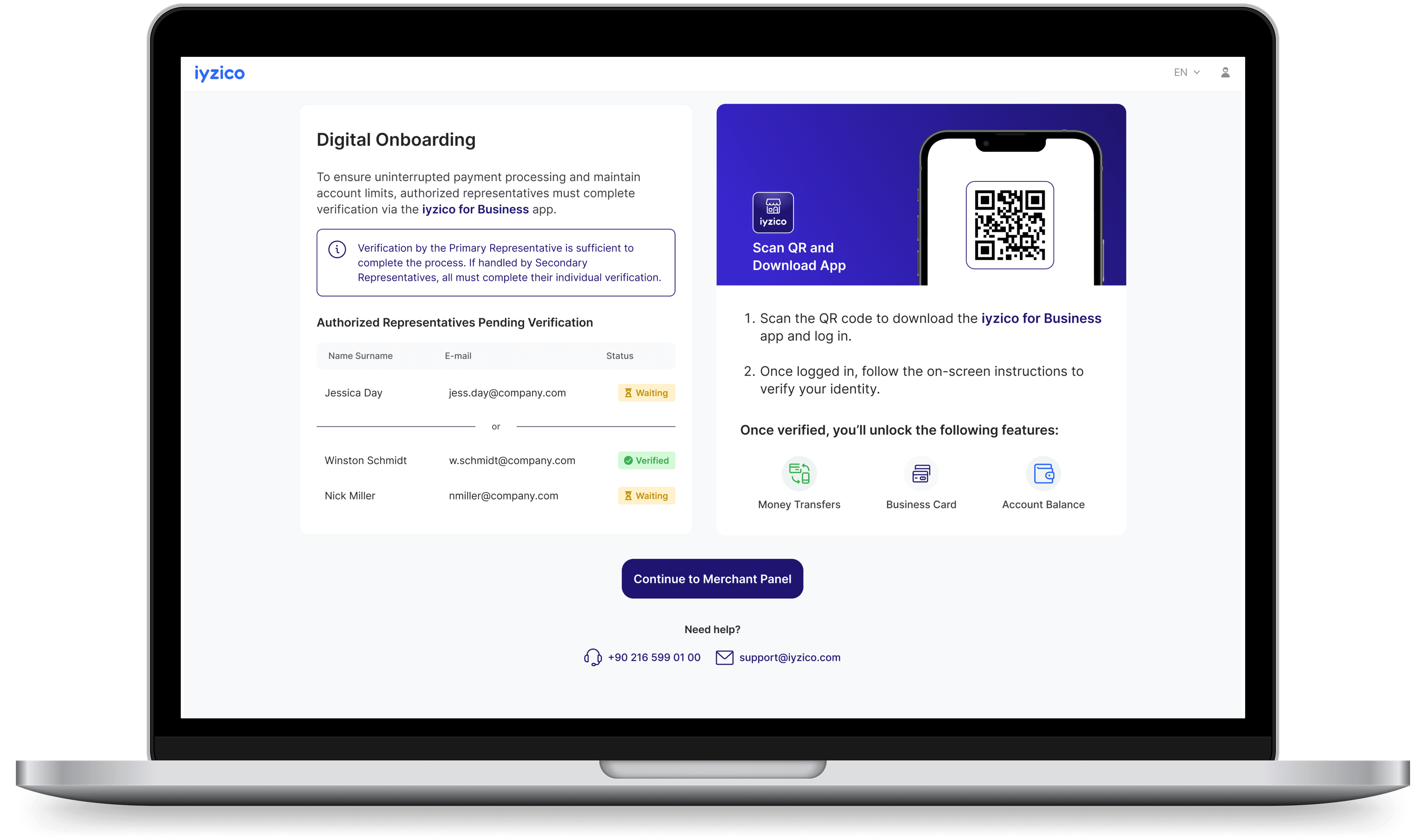
NDA: To respect policy, I am limited in publicly displaying and discussing this work. It is mostly about my stance on changing data, problems and my process.
Project Overview
This project involved designing a digital onboarding (DOB) experience for merchants using a B2B payment provider system panel. The main goal was to ensure regulatory compliance through a streamlined, secure, and user-friendly onboarding process — without disrupting existing merchant operations.
Pre-DOB Impact
~30%
of merchants do not have the legal documentation required for Digital Onboarding.
+40%
a new panel flow helped resolve this, leading to a 40% completion rate within the first week.
DOB Impact
Overall Success Rate
85%
first four months (first two months with MVP version & two months new in-house app)
Overall Success Rate Improvements
+24%
improvement in success rate after redesign (from MVP to new in-house app)
Success Rate Increase by Platform
iOS:+24%
Android: +17%
Note: Key accounts were exempt from this flow due to custom verification procedures and were not included in the final success rate.
Challenge
The project originated as a regulatory requirement: certain identity and legal documents of existing merchants were incomplete, and onboarding needed to be performed only by legally authorized company representatives.
The critical challenges included:
Adapting to complex legal authorization flows (e.g., single or multiple signatories with different rights),
Ensuring onboarding could happen without halting the merchants’ ongoing financial operations,
Overcoming the fact that most panel users did not use the mobile app, though the onboarding required camera and NFC access (e.g., ID chip scanning).
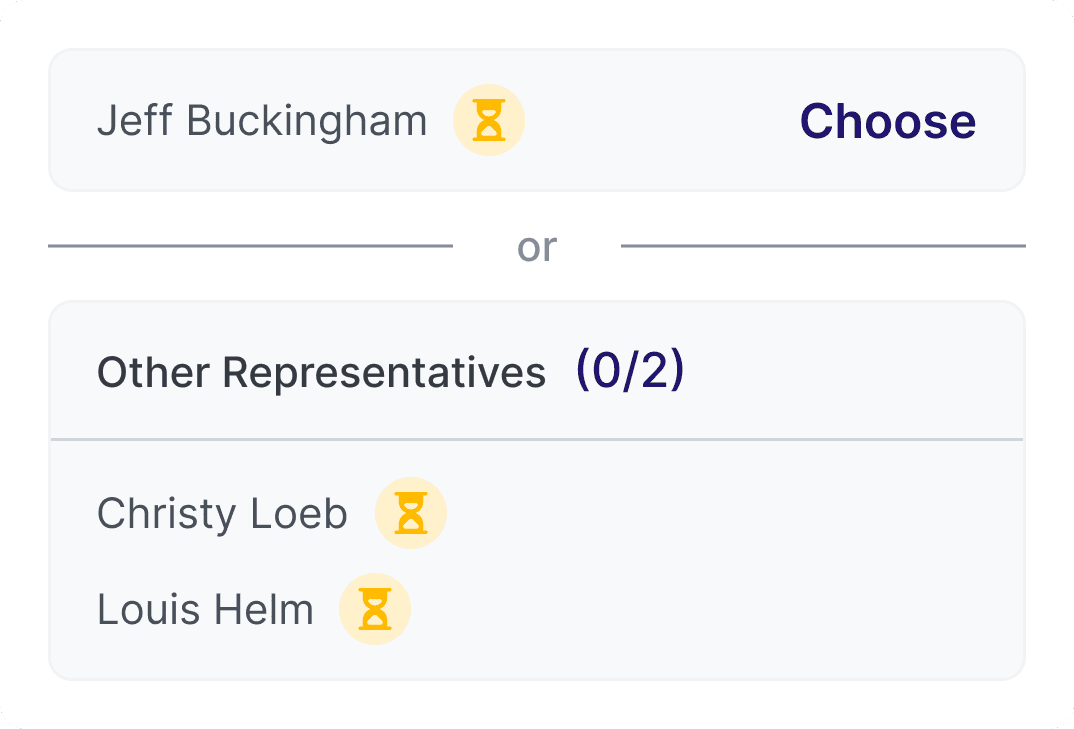
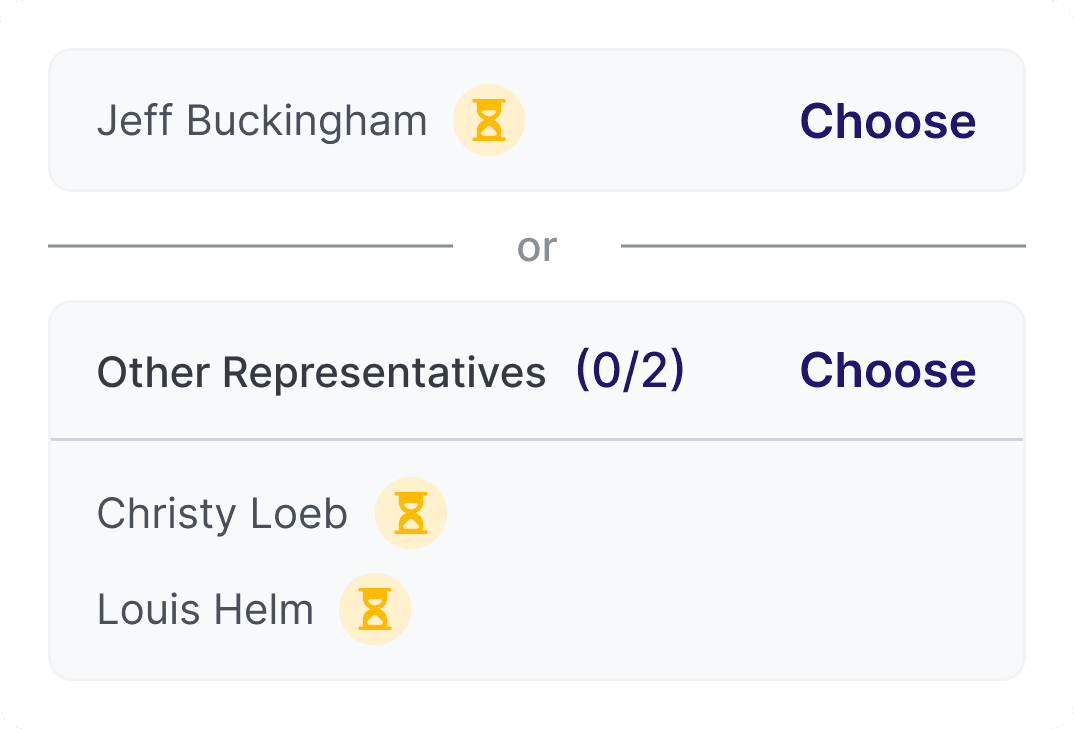
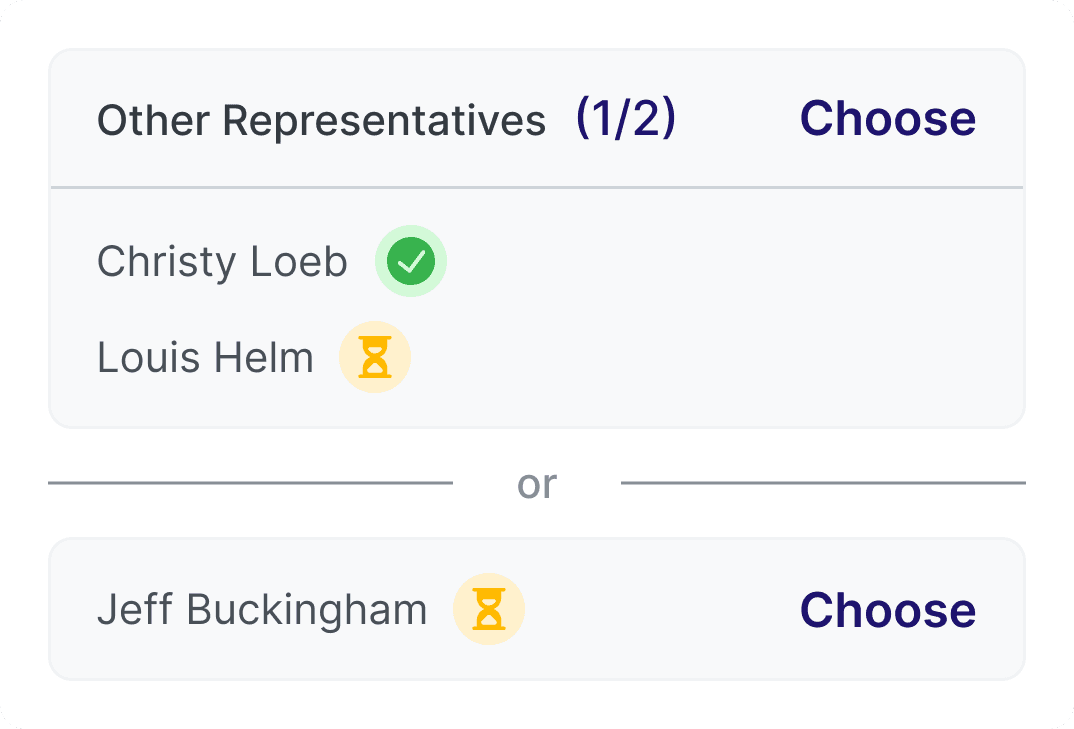
Mobile Components
Constraints
1
Regulatory-Driven Flow
The flow was shaped by strict legal requirements, leaving little room for UX deviation or experimentation.
2
No Initial Research
Due to regulatory clarity, user research wasn’t applicable. Competitor analysis revealed no comparable solutions for multi-signatory onboarding.
3
Tech Constraints
The first release relied on a third-party SDK, causing severe app performance issues and low success rates.
4
User Behavior Gap
90%+ of merchants used only the web panel, yet mobile onboarding was mandatory.
5
Data Gaps
Around 25–30% of merchants lacked required legal documents, which had to be completed before onboarding.
6
Role Complexity
Only authorized company representatives could complete onboarding, with four distinct user scenarios.
7
Authorization Logic
If a jointly authorized signatory completed onboarding, that was sufficient. If done by an individually authorized signatory, all others also had to complete it. This logic had to be reflected in both UI and backend validation.
Design Process
Due to tight deadlines and legal deadlines, the MVP version was launched quickly — but it revealed immediate pain points:
Merchants weren’t informed that they’d need to download a mobile app.
The third-party app performance led to multiple failed attempts.
Fail-states were unclear, leading to frustration.
Stage
What We Did
Empathize
Regulatory constraints limited external research. Instead, we analyzed internal support tickets, merchant behavior, and stakeholder feedback.
Define
Mapped out 4 key merchant user types and their onboarding blockers. Identified legal authority complexities as the core UX challenge.
Ideate
Collaborated with legal, compliance, and product teams to define adaptive flows for different signatory scenarios and edge cases.
Prototype
Designed multiple panel-based user flows (MVP and improved version), considering mobile app transitions and fail-state scenarios.
Test
Launched MVP, gathered insights from completion rates and support teams. Iterated with in-house app redesign for better performance and clarity.
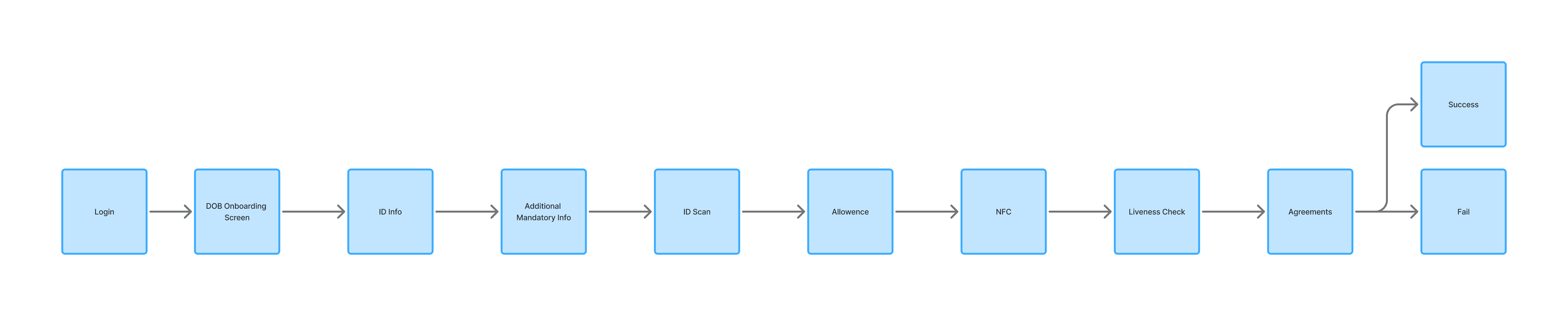
Happy Path: Applicant is the only authorized representative
We identified four distinct types of panel users which greatly influenced the onboarding logic and edge cases:
1
Applicant is the only authorized representative
covers ~88% of cases
2
Applicant is not an authorized representative
Authorized person’s phone number must be verified via OTP.
3
Applicant is an authorized representative, and there are multiple authorized representative
4
Applicant is not an authorized representative, and there are multiple authorized representative
The final user flow had to:
Detect the user’s authorization role,
Provide an appropriate onboarding path,
Allow for app switching (from panel to mobile),
Minimize business interruption (no blocking of active financial operations).
Key UX Consideration:
Onboarding actions had to be exclusively available to legal signatories, not just panel users. The system had to detect and enforce these cases without breaking existing flows or financial transaction capabilities.
Iteration
Based on user feedbacks after the MVP:
An in-house React Native app was developed to replace the third-party solution which significantly improved app performance and reliability.
A live video verification fallback was introduced for failed self-onboarding cases.
The interface was updated to clearly:
Indicate why onboarding was needed on different areas on the panel
Provide next steps when errors or blocks occurred.
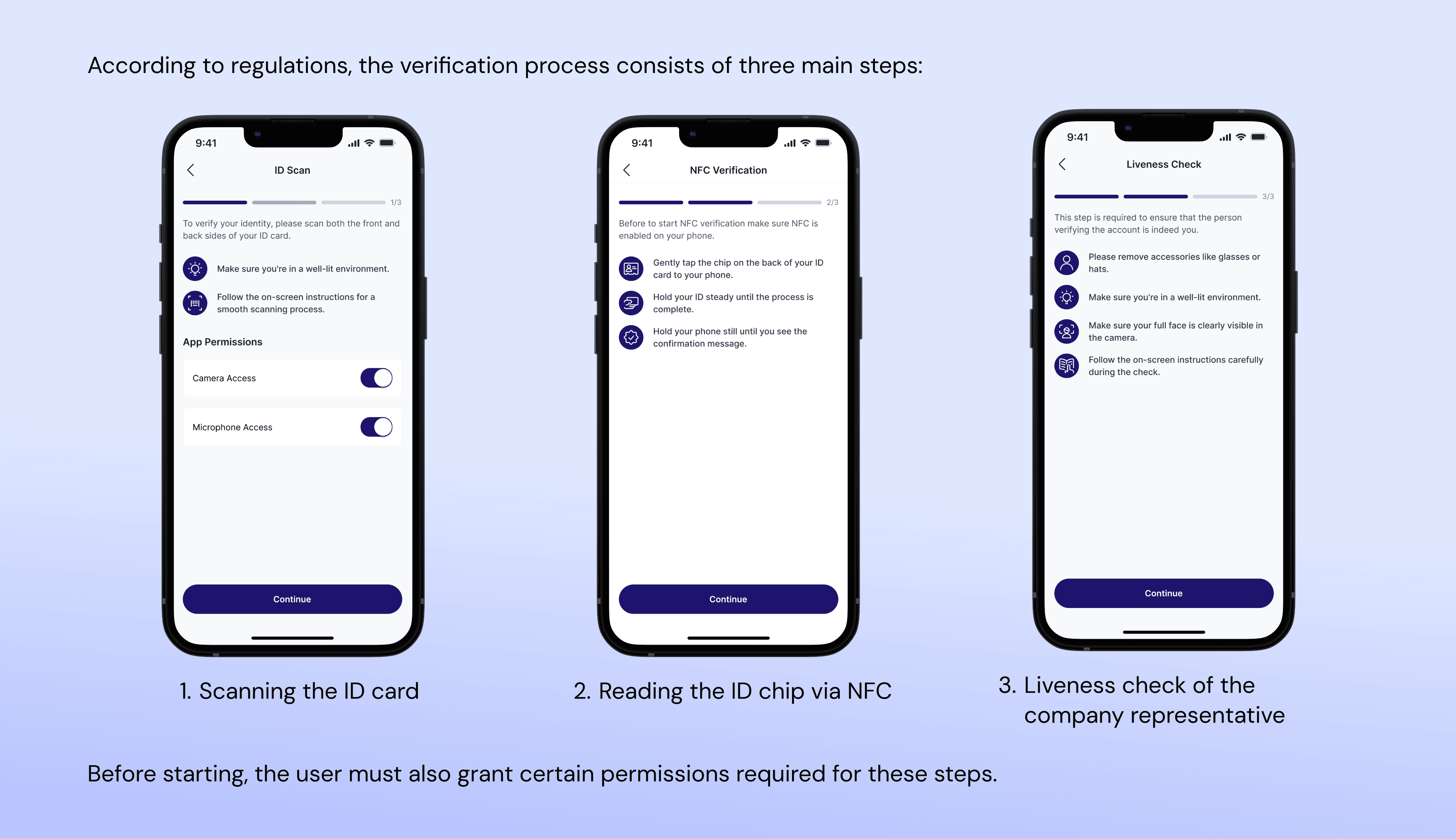
Design Solutions & Key Features
1
Swiping Prompts
Smart eligibility detection in the panel based on user role and company structure.
2
Human-Centered Interaction Flow
Document collection step in the panel to close legal gaps before onboarding starts.
3
Instant Access to Product Details
Mobile app integration from the panel, including QR-based transition to the app.
4
AI-Driven Personalization
Fail scenarios with human fallback: live agent video call-based flow when digital verification failed.
3
Instant Access to Product Details
Contextual guidance (tooltips, banners, alert states) based on the user’s legal role and what step remained.
Takeaways
Regulatory scope sharpened decision-making: Every UI component needed a clear justification to exist.
Limited research ≠ limited empathy: We relied on internal support tickets and business feedback to identify pain points and user needs.
Fail-state design was critical: Especially for mobile transitions and identity verification workflows
Legal complexity required adaptive UX: Multiple signatory cases showed the value of user segmentation and dynamic UI logic to simplify rigid legal requirements.